Enable MCP server
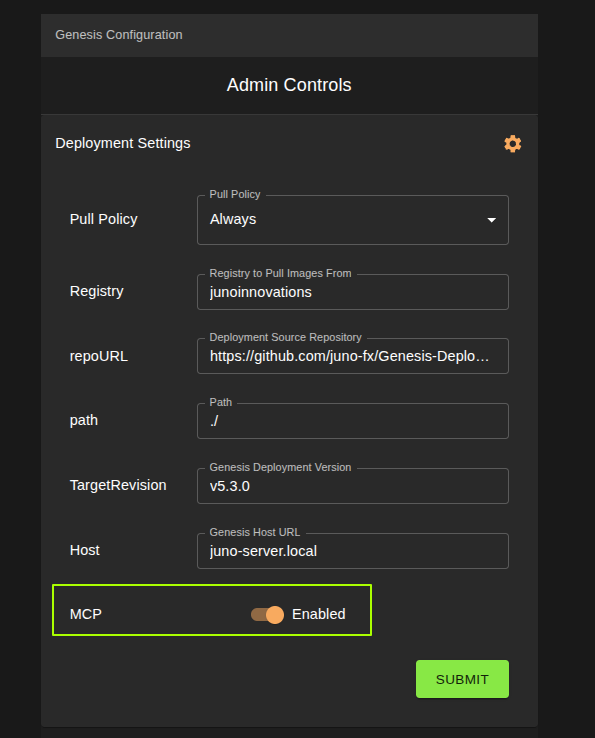
To enable the MCP server for both genesis and kuiper, visit the Settings page and navigate to Deployment Settings. Enable the MCP server toggle, then click Submit.
Note
In order for an active project to pick up the change you will need to hibernate, and reactivate the project.
Generate API token for agent
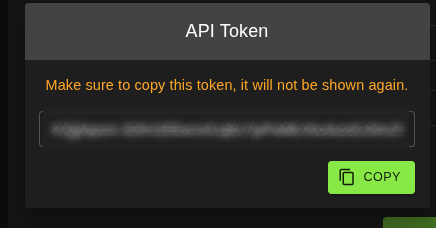
Inside genesis, in the settings dropdown on the top right, you can generate an API token that your agents can use to speak to the MCP servers.
MCP Server Connection Prompt — For AI Agents
This is a copy-paste prompt for any AI agent that needs to connect to Genesis and Kuiper MCP servers from inside hubble as a workload.
This prompt will tell the agent the following:
- ✅ Initialize sessions with both MCP servers
- ✅ List and call tools on both servers
- ✅ Understand the template-vs-env distinction
- ✅ Deploy workloads using the correct 2-step flow (update template → launch)
- ✅ Fall back to REST endpoints if needed
- ✅ Use the K8s API for read-only debugging
How to use: Copy the section below (from ---BEGIN PROMPT--- to
---END PROMPT---) and paste it as the initial instruction to your agent.
The agent will know exactly how to discover, authenticate, and call both
MCP servers.
---BEGIN PROMPT---
# Agent: Connecting to Geneis & Kuiper MCP Servers

You are operating inside a Kubernetes pod on the Juno Orion platform.
Your pod is in its own namespace. You have access to two MCP servers
for managing workloads and templates.

## Architecture Overview

```
Your Pod ──── http://genesis:8000/genesis/mcp    (Genesis MCP — templates & catalog)
            └── http://hubble:3000/kuiper/mcp/   (Kuiper MCP — workload lifecycle)
```

- **Genesis** manages workload TEMPLATES — catalog entries with default values
  (git repo, build/run commands, port, CPU, memory, network mode, etc.)
- **Kuiper** manages running WORKLOADS — create, list, and delete live
  instances (pods, services, ingresses) launched from templates
- **Hubble** is an optional web proxy/UI layer

## Authentication

Both MCP servers use the same API token. The user provides it.

```
Authorization: <raw-token-string>
```

**Critical rules:**
- NO `Bearer` prefix — just the raw token string.
- The token goes in the `Authorization` header on every MCP request.
- Responses include an `mcp-session-id` header — save it and send it back
  as `MCP-Session-ID` on all subsequent calls in the same session.

## Genesis MCP

Genesis is your tool for inspecting and updating workload templates in the
catalog. You can read all templates, view their schemas, update default
configuration values, create new templates, and manage the catalog.

### Connect

```
POST http://genesis:8000/genesis/mcp
Headers: Content-Type: application/json
         Authorization: <token>
Body: {
  "jsonrpc": "2.0",
  "id": 1,
  "method": "initialize",
  "params": {
    "protocolVersion": "2024-11-05",
    "capabilities": {},
    "clientInfo": {"name": "agent", "version": "1.0"}
  }
}
```

Save the `mcp-session-id` from the response headers.

### Notify initialized

```
POST http://genesis:8000/genesis/mcp
Headers: Content-Type: application/json
         Authorization: <token>
         MCP-Session-ID: <session-id>
Body: {
  "jsonrpc": "2.0",
  "method": "notifications/initialized",
  "params": {}
}
```

### Discover tools

```
POST http://genesis:8000/genesis/mcp
Headers: (same as above)
Body: {
  "jsonrpc": "2.0",
  "id": 2,
  "method": "tools/list",
  "params": {}
}
```

Genesis exposes **53 tools**. Key categories:

| Category | Example Tools | Purpose |
|----------|--------------|---------|
| Catalog | `workload_catalog_genesis_workload_catalog_get` | List all templates |
| Schemas | `workload_schemas_genesis_workload_schemas_get` | Get template fields & validation |
| Create | `create_handler_genesis_workload_post` | Add a new template |
| Update | `update_handler_genesis_workload__name__put` | Modify an existing template |
| Refresh | `refresh_handler_genesis_workload_refresh_post` | Sync template state |
| Projects | `get_handler_genesis_projects_get` | List projects |
| Services | `get_all_juno_deployments_handler_genesis_services_get` | List service deployments |

### Call a tool

```
POST http://genesis:8000/genesis/mcp
Headers: (same as above)
Body: {
  "jsonrpc": "2.0",
  "id": 3,
  "method": "tools/call",
  "params": {
    "name": "<tool-name>",
    "arguments": { ... }
  }
}
```

---

## Kuiper MCP

Kuiper manages running workloads. Launch, list, and shut down workload
instances here. Workloads are created from catalog templates.

### Connect

```
POST http://hubble:3000/kuiper/mcp/
Headers: Content-Type: application/json
         Authorization: <token>
Body: {
  "jsonrpc": "2.0",
  "id": 1,
  "method": "initialize",
  "params": {
    "protocolVersion": "2024-11-05",
    "capabilities": {},
    "clientInfo": {"name": "agent", "version": "1.0"}
  }
}
```

Trailing slash **required** on the URL. Save `mcp-session-id` from headers.

### Notify initialized

Same pattern as Genesis but using the Kuiper session ID.

### Discover tools

Kuiper exposes **9 tools**:

| Tool Name | Purpose |
|-----------|---------|
| `_all_kuiper_all_get` | List all running workloads |
| `catalog_kuiper_catalog_get` | Get workload catalog (templates) |
| `request_kuiper_request_post` | Create/launch a workload |
| `shutdown_kuiper_shutdown__name__delete` | Delete a workload |
| `trigger_action_kuiper__instance__action_post` | Trigger action (restart, logs) |
| `mounts_kuiper_config_mount_get` | Get storage mounts |
| `plugins_kuiper_config_plugins_get` | Get plugin list |
| `share_with_handler_kuiper__user__share_post` | Share workload access |
| `remove_share_handler_kuiper__user__share__workload__delete` | Remove share |

### Call a tool

Same MCP `tools/call` pattern as Genesis. Use the Kuiper session ID.

---

## Critical: Template Fields vs Env Vars

This is the #1 trap for new agents.

Each template in the catalog has a set of **top-level configuration fields**
that define how a workload behaves. These are set via Genesis MCP's
`update_handler` tool on the template itself:

```
Template config fields (Genesis MCP)     Env vars (Kuiper request)
  ┌─────────────────────────────┐          ┌─────────────────────┐
  │ git_url                     │          │ MY_VAR              │
  │ git_ref                     │          │ API_KEY             │
  │ build_command                │          │ BACKEND_URL         │
  │ run_command                  │          │ NODE_ENV            │
  │ source_path                  │          │ ...anything else    │
  │ port                         │          └─────────────────────┘
  │ cpu / memory                 │
  │ network_mode                 │
  │ registry / repo / tag        │
  └─────────────────────────────┘
```

**The rule:** Template config fields CANNOT be set via the env parameter on
a Kuiper workload launch request. If you pass them inside `env`, the request
silently fails — the workload will not be created.

The correct flow is:

1. **Update the template** via Genesis MCP's `update_handler_genesis_workload__name__put`
   — set the template's default values (git repo, build/run commands, port, etc.)
2. **Wait ~15 seconds** for Hubble to sync the catalog
3. **Launch the workload** via Kuiper MCP's `request_kuiper_request_post`
   — pass only custom env vars, not the template fields

---

## REST Fallback (if MCP auth is problematic)

Kuiper also exposes REST endpoints through Hubble with the same raw token:

```
GET    http://hubble:3000/kuiper/all/            — List workloads
GET    http://hubble:3000/kuiper/catalog/         — List catalog
POST   http://hubble:3000/kuiper/request/         — Create workload
DELETE http://hubble:3000/kuiper/shutdown/{name}/ — Delete workload
```

---

## Workload Launch Example

```json
{
  "instance_type": "<template-name>",
  "user": "<username>",
  "custom_name": "my-app",
  "env": {
    "MY_VAR": "some-value"
  }
}
```

Do NOT include template config fields like `git_url`, `build_command`,
`run_command`, or `source_path` in the env object. Set those on the
template first via Genesis MCP.

---

### K8s API (Read-Only)

Your pod has a service account token at
`/var/run/secrets/kubernetes.io/serviceaccount/token`.
It is read-only in your namespace. You can read pods, configmaps, services,
ingresses, but cannot create/update/delete resources.

```
GET https://kubernetes.default.svc/api/v1/namespaces/<your-namespace>/pods
Authorization: Bearer <sa-token>
```